
 English
 Español
 Deutsch
 Français
 Português
 Русский
 عربي
عربي Melayu
 Indonesia
 Tiếng Việt
 Filipino


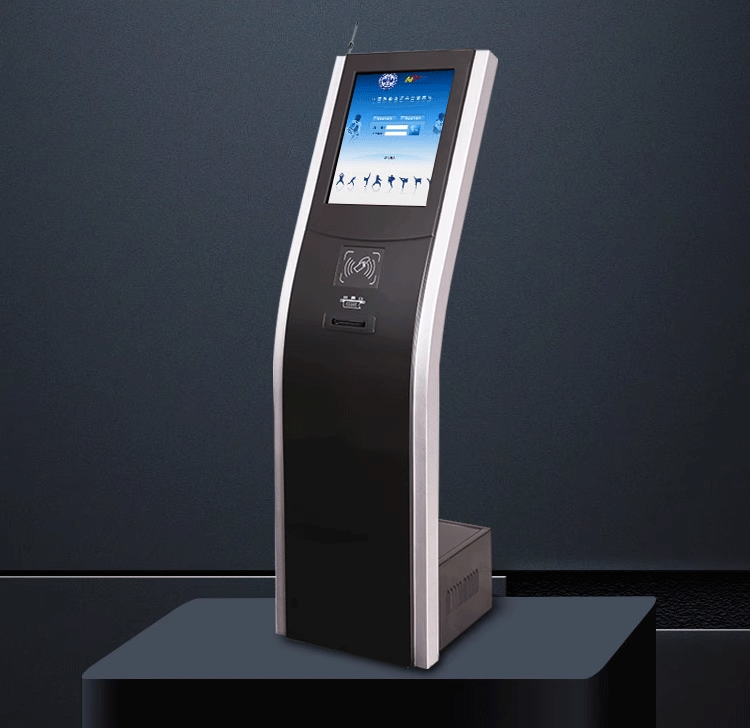
Restaurant electronic podium display service equipment digital interactive touch queue screen management system
- Installation: Vertical;
- Screen: Touchscreen;
- Operating System: Android; Windows;
- Size: 15.6''; 19''; 21.5'';
Bank VIP Dynamic Zone Management: Fingerprint Recognition + Evaluation Device Integration in Queue Systems
1. Background & Requirements
Bank service efficiency directly impacts customer experience, especially for VIP clients demanding exclusive services. Traditional queue systems struggle with dynamic zone management and accurate identity verification, causing VIPs to mix with regular customers. This solution integrates fingerprint recognition + service evaluators to:
Auto-identify VIPs: Verify identity via fingerprint/face recognition in seconds
Dynamic counter allocation: Adjust VIP counters based on real-time customer
Closed-loop service: Instant post-service feedback for quality optimization
2. Core Features
2.1 Fingerprint Recognition Module
Biometric capture: Supports fingerprint/vein/face recognition (optional)
VIP pre-registration: Bank enrolls VIP biometrics for automatic tier matching (e.g., Diamond/Gold)
Fast-track triggering: Auto-assigns priority queue and alerts relationship managers
2.2 Dynamic Zone Management
Smart counter allocation:
Off-peak: 1 VIP + 2 regular counters
Peak hours: Dynamically adds VIP counters (max 3)
Display optimization:
VIP screens show partial names (e.g., "Mr. Zhang")
Regular screens hide VIP queues
2.3 Service Evaluator Integration
Real-time feedback:
5-star ratings + optional tags (e.g., "Efficient", "Friendly")
Syncs to bank CRM for staff performance review
Low-rating handling:
Scores ≤2 stars trigger supervisor alerts for follow-up within 15 mins
3. Hardware Configuration
Device | Specifications | Location |
Fingerprint kiosk | Optical sensor (FAR≤0.001%) | Entrance/VIP area |
Dynamic display | 55" LED, multi-queue split-screen | Waiting zone |
Wireless evaluator | Tamper-proof, IP65 rated | Each counter |
VIP call terminal | Quick-call buttons + voice broadcast | Wealth management room |

4. Optimized Workflow
4.1 VIP Service Process
1.Identification: Customer scans fingerprint → system matches VIP tier
2.Priority ticket: Assigns VIP queue + SMS wait time estimate
3.Service trigger: RM’s screen displays customer profile/history
4.Evaluation: Post-service rating → real-time CRM upload
4.2 Dynamic Counter Rules
Engine logic:
≥3 VIPs waiting → opens 2nd VIP counter
Regular wait >15min → converts 1 counter to hybrid mode
Manual override: Managers adjust via tablet
5. Security & Privacy
Biometric encryption: Fingerprint templates stored with AES-256
Data masking: Screens show only surnames (e.g., "Mr. Li")
Audit trail: All VIP logs blockchain-recorded
6. Case Study (State-owned Bank)
VIP satisfaction: 82% → 96%
Wait time: Diamond clients: 12 → 4 minutes
Low-rating resolution: 60% → 90% within 24hrs
7. Future Upgrades
AI prediction: Forecasts VIP visits for staff planning
Contactless ID: Face recognition + behavior analysis
Mobile integration: Real-time queue tracking via bank app
Related Products


self-service touch screen-3
Profession touch ticket dispenser LED counter LCD TV display keypad wireless queue screen management system
Get in Touch
For further information, don't hesitate to reach out to us via email.
Please be aware that our responses to your inquiries via email might sometimes end up in your spam folder. If you've sent us an inquiry email but haven't received a reply through phone or Whatsapp, we recommend checking your spam folder. Thank you for your understanding and patience.


